Sunday, 31 March 2019

Top technologies in 2019 - Top Inventions that you didn't know!


Top technologies to learn in 2019, you will learn all the trending technologies in the market in 2019. The end goal of this video is to educate you about the latest technologies to learn and all the top 10 trending technologies you can watch for in order to make a fantastic career in IT technologies in 2019.

#TopTechnologiesToLearnIn2019 #TrendingTechnologies2019 #TopInventionsIn2019 #learn #eternity #trending #videos

Subscribe to this amazing youtube channel for amazing videos : Learn Eternity

s


Artificial Intelligence: Artificial intelligence (AI) is an area of computer science that emphasizes the creation of intelligent machines that work and react like humans.


Self-Driving Cars: A self-driving car, also known as a robot car, autonomous car, or driver less car, is a vehicle that is capable of sensing its environment and moving with little or no human input.


Robotics: Robotics is an interdisciplinary branch of engineering and science that includes mechanical engineering, electronic engineering, information engineering, computer science, and others.


Virtual Reality: Virtual reality (VR) is an interactive computer-generated experience taking place within a simulated environment. It incorporates mainly auditory and visual feedback, but may also allow other types of sensory feedback. This immersive environment can be similar to the real world or it can be fantastical.


Flying Cars: A flying car is a type of personal air vehicle or roadable aircraft that provides door-to-door transportation by both ground and air. The term "flying car" is also sometimes used to include hover cars.


Hyper loop: A Hyper loop is a proposed mode of passenger and / or freight transportation, first used to describe an open-source vactrain design released by a joint team from Tesla and SpaceX.


ECG on Apple Watch: An electrocardiogram (also called an ECG or EKG) is a test that records the timing and strength of the electrical signals that make the heart beat. By looking at an ECG, a doctor can gain insights about your heart rhythm and look for irregularities. The ECG app can record your heartbeat and rhythm using the electrical heart sensor on Apple Watch Series 4 and then check the recording for atrial fibrillation (AFib), a form of irregular rhythm.


Google Stadia: Stadia is a cloud gaming service operated by multinational technology company Google. It is capable of streaming video games in 4K resolution at 60 frames per second, with support for high-dynamic-range, to players via the company's numerous data centers across the globe.


Automated House: Home automation or domestics is building automation for a home, called a smart home or smart house. A home automation system will control lighting, climate, entertainment systems, and appliances. ... When connected with the Internet, home devices are an important constituent of the Internet of Things.


Electric Cars: An electric car (also battery electric car or all-electric car) is a plug-in electric automobile that is propelled by one or more electric motors, using energy typically stored in rechargeable batteries.


Thursday, 21 March 2019

Top 5 Features of Android Q - Beta Version


Today's video is regarding the top 5 features of newly launched Android Q Beta Version.


1. Sharing wifi allows the user to share wifi access to another user where the QR code is generated. To access the wifi the user needs to scan the code. 


2. Multiple Theme colour changes have arrived in android Q.


3. The accent colour can be changed to black, green, blue and purple. the system font and the icon shape can be changed.


4. The dark mode can be activated by enabling the battery saver mode. 


5. To dismiss the notifications, now we need to swipe to the right, and the swipe to the left, provide us with other options. 


Other Features: 
- Support for foldable phones will be released in the upcoming beta versions.
which is scheduled for the 3rd quarter of 2019.
- More usable screen recording app. 
- Auto-reply from the notification centre. 

Finally, what will android Q be named? 

Quindim.Qurabiya.queen of pudding.qottab. quirks. or something else. 

Share your guesses for Android Q, version name by posting your comment Below.

Sources referred from the following website : 
https://www.xda-developers.com/android-q-beta-changes-google-pixel/


Thursday, 3 March 2016

Best Tech Under 100 Dollar
March 2016 Edition


Today we are going to look at Best tech under 100 dollar :) , it is always amazing when we got something which we like in low budget and We always look forward  to buy those products.
If you are a Tech savvy then here we go, today we are going to look at top 5 tech under 100 dollar.
The tech product i am going to share are from amazon website, So you are good to go if you have access to amazon website, which sure you will have.
So let's get Started  :)

1)  BookArc Mod For MacBook :  

BookArc mod from Twelve South is a meticulously crafted hardwood MacBook stand that blurs the lines between furniture and technology. Inspired by the remarkable spaces many MacBook owners inhabit, this beautiful arc shaped stand elevates your aluminum MacBook up off your desk, freeing up desk real estate and creating a clean workspace. BookArc mod is compatible with all MacBook's and features a beautiful Birch finish.

Twelve South BookArc mod for MacBook ,Wood Stand

Twelve South BookArc for MacBooks, silver stand

 Links To Purchase : 

Click On Following Links :


2. DOTTI Smart Pixel Art Light with Notifications for iPhone iOS and Android Smartphones

  • Syncs with your smartphone and lets you know when you receive or miss phone calls, text messages, emails, and calendar events
  • Provides notifications from Facebook, Twitter, Skype, WhatsApp, WeChat and many more social apps
  • Create your own icons and animations, download content from the Witti Gallery, share with your friends by posting on FaceBook, sending with WhatsApp or submitting to the Witti Gallery - save unlimited content on your phone

Links To Purchase : 
Click On Following Links : 


$69.99


3. Logitech K750 Keyboard for Windows & Mac OS : 


  • Solar-powered keyboard: No battery hassles - any light source keeps your keyboard charged for at least three months in total darkness
  • Only 1/3-inch thick: Ultra-thin design adds sleek style to your workspace
  • Familiar Mac layout: All the keys you're used to, plus a Launchpad hot key, are exactly where you expect them
  • Feel-good typing: Logitech-only concave key cap design for faster, quieter, more comfortable typing
  • Tiny Logitech Unifying receiver: Stays in your laptop and connects additional compatible wireless devices
  • Works with Windows-based laptop and desktop PCs
  • Powerful 2.4 GHz wireless: Enjoy a reliable connection using a tiny Logitech Unifying receiver that stays in your computer


Logitech Wireless Solar Keyboard K750 for Mac - Silver


Logitech Wireless Solar Keyboard K750


Links To Purchase : 
Click On Following Links : 

2. Logitech Wireless Solar Keyboard K750 ( Mac ) :                 $49.99

4. Logitech G602 Wireless Gaming Mouse with 250 Hour Battery Life

  • High-accuracy Delta Zero sensor technology
  • Lag-free gaming-grade wireless, Performance and Endurance modes maximize battery life
  • Long-life buttons rated to 20 million clicks, 11 programmable buttons
  • For Windows 10, Windows 8, Windows 7, Windows Vista, and Mac OS X 10.6.8 or higher. 


Links To Purchase : 
Click On Following Links :
1. Logitech G602 Wireless Gaming Mouse :      $54.95


5. Philips 800284 Hue Lightstrip Plus, 2nd Generation


  • New and enhanced Hue LightStrip that allows you to shape, end and extend up to 33 feet
  • Design your own personal lighting system using the Philips LightStrip Kit that includes a 6ft LightStrip
  • Place under furniture or kitchen cabinets, into coves or highlight architectural features with indirect white light
  • Extend up to 33 feet by adding LightStrip Plus extensions, will full color consistency from the first to the last extension
  • Enjoy light effects synced to our music and extend you TV experience to the whole room, or lift your gaming experience to the next level


Links To Purchase : 
Click On Following Links :

1.Philips 800284 Hue Lightstrip Plus :    $89.99


Monday, 29 June 2015

YU Yuphoria Review

YU Yuphoria Review

Impressive Design
Micromax’s online-only smartphone company called Yu has launched there first smartphone that is Yu Yureka on May 12. Now Yu released there another Cyanogen OS based smartphone Yu Yuphoria. Yuphoria is budget mobile with lower price as compare to feature there are providing in this smartphone. The design is much impressive with metallic frame,the back cover is made up of plastic and is removable.  It comes in two colours, Buffed Steel with black cover and Champagne Gold with white cover. In order to buy Yuphoria you have to sign in with your amazon account and head over to the following link Amaon Yophoria . The following image shows steps regarding how to buy yuphoria smartphone.Now let's see some of the features :

Yuphoria Specification
Yuphoria Features (Source : amazon.in)
  • Product Name : Yuphoroia
  • Processor : Qualcomm Snapdragon 410 1.2GHz
  • Graphic Unit : Adreno 306
  • Operating System  : Cyanogen OS 12 (Android Lollipop)
  • Storage : RAM - 2GB , Internal Storage - 16 GB, microSD up to 32GB
  • Battery Capacity : 2230mAh
  • Screen Design : 5.0 inch , HD IPS , 1280x720 pixels (294ppi), Sorning Gorilla Glass 3
  • SIM : Dual Sim (Micro)
  • Camera : Rear - 8MP , Front - 5MP, With Rear LED flash
  • Video : 1080p Full HD Recording
  • Price : Rs. 6,999
Follow following steps in order to purchase yuphoria :


Saturday, 27 June 2015

The oneplus 2

The OnePlus 2

            OnePlus is a Chinese smartphone manufacturer founded in December 2013.The company introduced its first device, the OnePlus One, on 23 April 2014. OnePlus One was exclusively introduced in India through Amazon.Now company is on way of introducing it's second smartphone they reveal that the OnePlus 2 release date is July 27 at 7:00 PT and it will launched entirely in virtual reality.OnePlus Two launch event will not be a regular event with “an auditorium, a keynote it will be completely in Virtual Reality(VR).


     The OnePlus 2 will be the first product launch to occur in VR. / © ANDROIDPIT

OnePlus 2 specs 

  • Release Date : July 27, 2015 at 7:00 PT
  • Operating System : Android 5.1 Lollipop
  • Display : 5.5-inch IPS LTPS full HD display, support for up to 10 fingers,Corning Gorilla Glass 4,1080 x 1920 pixels resolution.
  • Battery : 3300 mAh (Non Removable) 
  • Camera : 16 MP (Back) autofocus, Geo-tagging, touch focus, face detection, panorama, HDR,Dual LED Flash, Secondry Camera : 5 MP (Front)
  • Processor : 2.7GHz Krait 450 quad-core processor based on Qualcomm Snapdragon 805 chipset
  • RAM : 3GB RAM
  • Graphic Unit : Adreno 420 graphics unit
  • Video Recording : 4K videos at 30fps and 1,080p ones at 60fps
  • Connectivity : 4G LTE (selected markets), 3G,Bluetooth v4.1,NFC , USB : Micro HDMI : No
  • Internal Memory : 16 GB
  • Sensors : Accelerometer,Proximity,Gyroscope,Digtal Compass
  • Warranty : 1 Year
  • Price : Gizchina reported that Pete Lau, founder and CEO of OnePlus, had said that 2499.99 Yuan (402 USD) sounded like a good price for the OnePlus 2 (after having the figure suggested to him by a poster on Weibo).

OnePlus has confirmed that the OnePlus 2 will still be sold using the invite system, at least to begin with.


Monday, 8 July 2013

How To Block Any Website ?

 How To Block Any Website ?

Blocking Facebook ?


1. Go to Start > Programmes > Accesories
2. Then Right click on Notepad and Run it as administrator.
3. Now open host file by clicking on File > Open and locate to following address

     C:\WINDOWS\system32\drivers\etc

4. Then just below # 127.0.0.1 localhost paste folowing code

# Blocking Facebook
127.0.0.1 login.facebook.com
127.0.0.1 www.facebook.com
127.0.0.1 apps.facebook.com
127.0.0.1 blog.facebook.com

5. Now save the host file and done.
6. Open any browser and try to open facebook. It won't open. If facebook opens then you might have done somthing wrong. (let me know if you face any problem)

Blocking Other Website

If you want to block website other then facebook then change facebook address with whatever website you want to block. For example: to block google paste following code below # 127.0.0.1 localhost

# block google
127.0.0.1 www.google.com

Friday, 31 May 2013

HTML Tutorial Series

HTML TUTORIAL SERIES

We have started a new tutorial series 'HTML'
Kindly watch all videos for more information. If you are getting trouble you can mail us in our Email-Id : suhasgawde10@gmail.com


click below link to watch the entire series.
For Full HTML Tutorial Series Click This Link : Html Tutorial

Thursday, 23 May 2013

Microsoft's Xbox One: What You Need to Know

After much speculation, Microsoft this week finally unveiled its next-generation console, the Xbox One.
We'll hear more details at next month's E3 gaming conference; Redmond has scheduled a June 10 press event. But we won't actually get our hands on the Xbox One until "later this year" - likely around the 2013 holiday shopping crush.
Still, Microsoft provided a good amount of detail about the Xbox One, topping Sony's PS4 announcement by actually showing us what the Xbox One looks like. Here's a rundown of what we know about the new console, so far.


What am I getting with the Xbox One? Buyers will get the new Xbox One console, a revamped controller, and an updated Kinect sensor.
I need the Kinect for the Xbox One? Yes. As we saw in yesterday's demo, voice and gesture are a big part of the new console. "The all new Kinect is now an essential and integrated part of the platform," according to Microsoft.

For More Information Visit : www.pcmag.com


Wednesday, 8 May 2013

Turn your Android smartphone into a laptop with Casetop

Turn your Android smartphone into a laptop with Casetop


Livi Design believes their new Casetop project is “one of the most important technological devices since the iPhone.” We wouldn’t go that far, but their gadget that turns almost any smartphone into a laptop is still a pretty cool idea. We have seen this concept before with Motorola’s Lapdock (which didn’t sell very well), but it’s still nice to see someone pushing this type of device foward.

The Casetop is compatible with any smartphone that has a video out option and bluetooth. They use standardized ports such as HDMI, MHL and MicroUSB for displaying video and Bluetooth for keyboard and mouse connectivity. The current prototype features a 10-inch 720p display, but Livi Design hopes to upgrade that to a 1080p display by launch and possibly add a touch screen if they hit their stretch funding goal.

For More Information Visit : androidandme.com

Watch This Video To get Idea : 


Wednesday, 1 May 2013

Google Launches Inactive Account Manager to Delete Your Files After You Death

Google Launches Inactive Account Manager to Delete Your Files After You Death


Google has opened a new service to let people control what happens to their email, online photos and blogposts saved in its accounts, as concern grows over what happens to users' "digital life" when they die.

Called Inactive Account Manager – which Google's Andreas Tuerk accepts is "not a great name" – it will let users decide whether to trigger it if they haven't logged in for three, six, nine or 12 months, and then either delete their data or send all or selected elements to a nominated person of their choice.


The move comes after increasing concern about problems encountered by families who have been trying to access or shut down accounts on sites such as Facebook after the sudden death of relatives, and amid controversy over the proposed "right to be forgotten" that the European Union is trying to introduce over digital information.

Google's new service joins a number of offerings to handle the aftermath of a "digital death", typified by services such as Entrustet, which let people decide what messages and access to information they want surviving relatives or friends to see after their death. With use of social networks becoming prevalent and an important window into peoples' lives and friends, there have been recent examples of relatives of the dead being unable to gain access to the dead peoples' accounts: the family of one soldier was refused access to his email by Yahoo, and some families have had to seek court orders to gain access to the Facebook accounts of the deceased.............


For More Information Watch This Video :


Monday, 29 April 2013

Google’s smartwatch Watch "review"

Google’s smartwatch Watch "review"

Google is starting to get into the “wearable computer” game with Google Glass — their augmented reality cyber-monocle (is it too late to trademark that name?). That approach really makes sense if you’re want to put the ability to record video and audio, and take still pictures somewhere omnipresent — like on your face. Sure, the privacy concerns have already prompted at least one place to ban the not-yet-available product from their establishment, but the concept is cool, and a little creepy.

Google’s smart watch needs to have a higher resolution, color screen to differentiate it from the several smart watches already on the market. It also needs to include Google Now integration, putting info cards literally on your wrist.  Everything that you normally would get by pulling out your smartphone and firing up Google Now would be right there at your fingertips. Time to home or work, right where you need it. Weather conditions and short-term forecast immediately available. Birthdays. Appointments. Events. What’s nearby. Sports scores. Stock quotes. All this and everything Google adds to Google Now in the future would be right there where you need it most.


Want to search for something? No problem, ask your watch. Via its Bluetooth connection to your Internet-connected smartphone, the information you’re looking for would be presented on your wrist. Of course this implies being able to talk into your watch, but also for your watch to be able to answer you back. Could this be the next incarnation of the speakerphone? Perhaps.

Watch Video :


For More Information : http://androidandme.com/2013/04/news/this-nexus-watch-concept-video-has-us-even-more-excited-for-googles-smartwatch/

Microsoft is Ending Support for Windows XP in 2014

Microsoft is Ending Support for Windows XP in 2014


Microsoft is going to end it's support for supporting windows xp. Microsoft will end it's Support On April 8 2014. Microsoft is supporting the windows xp from last 12 years. Microsoft has a huge Amount of People using the windows xp. But as Windows 7 as well as now windows 8 is taking place of windows xp. Microsoft decide that they will end the Support of windows xp in april 2014.


What Happens when Microsoft ends the Support for windows xp ?

After MS stop supporting the windows xp,no new security patches for Windows XP will be produced. Windows Xp will remain stable for it's working, no new updates,no new Security Patches are going to available for windows xp.

Windows xp is Not going to stop working, it will continue on working as well as you can download it's old security patches. 


If you still want to use xp :


You can Use Windows xp even if microsoft ending it's support. It is risky to use it as No security Patches will be available But You Still can Use Windows xp in virtual pc. Like Windows 98, Windows xp is going to be invisible after longer time of service with big people support


For More Information : How to Geek

For More Information Watch this video : 


Saturday, 27 April 2013

How to Use Your Android Device as a Mouse, Keyboard, Joystick and More


What Are the Options?

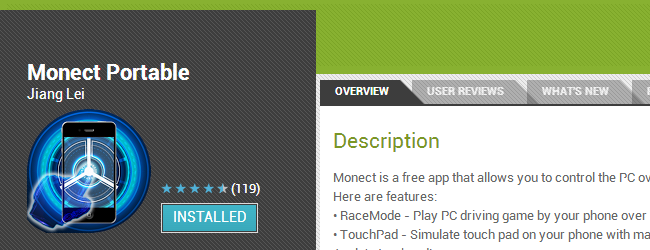
There are plenty of apps available in Google Player that let you use your phone or tablet as a wireless keyboard or mouse for a computer. Monect can be used in this way, but it also boasts a number of other options that cater to a variety of scenarios.


This free app can transform your phone into not only a mouse or keyboard, but also a joystick, gamepad, media controller and much more. It’s great for gamers, but options such as text transfer and presentation mode open up additional opportunities.
There are two components to the tool, the Android app and the desktop server. A package containing both pieces of software can be downloaded from its Hotfile hosting page.


There’s no need to sign up for an account, just click the Regular Download button, wait for the timer to count down and then click the download link. You may see a warning from your browser or AV tool that the file is potentially harmful, but this is simply a case of overzealousness in detecting a tool that is used for remote access.


You’ll need to extract the contents of the zip file and then launch the file named MonectHost. You’ll probably find that your firewall kicks in and you’ll need to allow the program to make use of your network in order to continue.


Getting Connected
Assuming your phone and computer are connected to the same wireless network, it will take a matter of seconds to establish a connection.
On your phone or tablet, install a copy of Monect from Google Play, launch the app and then either type in the IP address of your computer and tap Connect, or tap ‘Search host’ to scan for and connect to your machine.  If you find that you are unable to connect, trying restarting Windows to ensure that the installation is complete.


Once connected, you’ll see that are no less than 12 different modes to choose from; in most cases it is fairly obvious what each one does, and each can be used in different ways.

Controller Modes
Touchpad mode turns your phone into a laptop-style trackpad complete with a scroll bar to the right. In this mode you can also access 3D Mouse mode which enables you to move the cursor around by using your phone as a laser pointer.


Typewriter keys, Function keys and Numeric keypad are all modes in which you can use your phone as a keyboard. This can be handy if your keyboard is broken and you need a temporary replacement, or you are using a laptop or keyboard without a number pad.

In Text Transfer mode it is possible to type and prepare text on your phone and then send it to whatever application currently has focus on your computer.


For More Information  : How To Geek


computer solution Feed